
Sole Trader Tax Spreadsheet Australia FY2026-27, Side Hustle ABN, Excel and Google Sheets
You've got a job, and an ABN on the side. Money lands from a client or an online shop payout and you think, how much of this is actually mine?
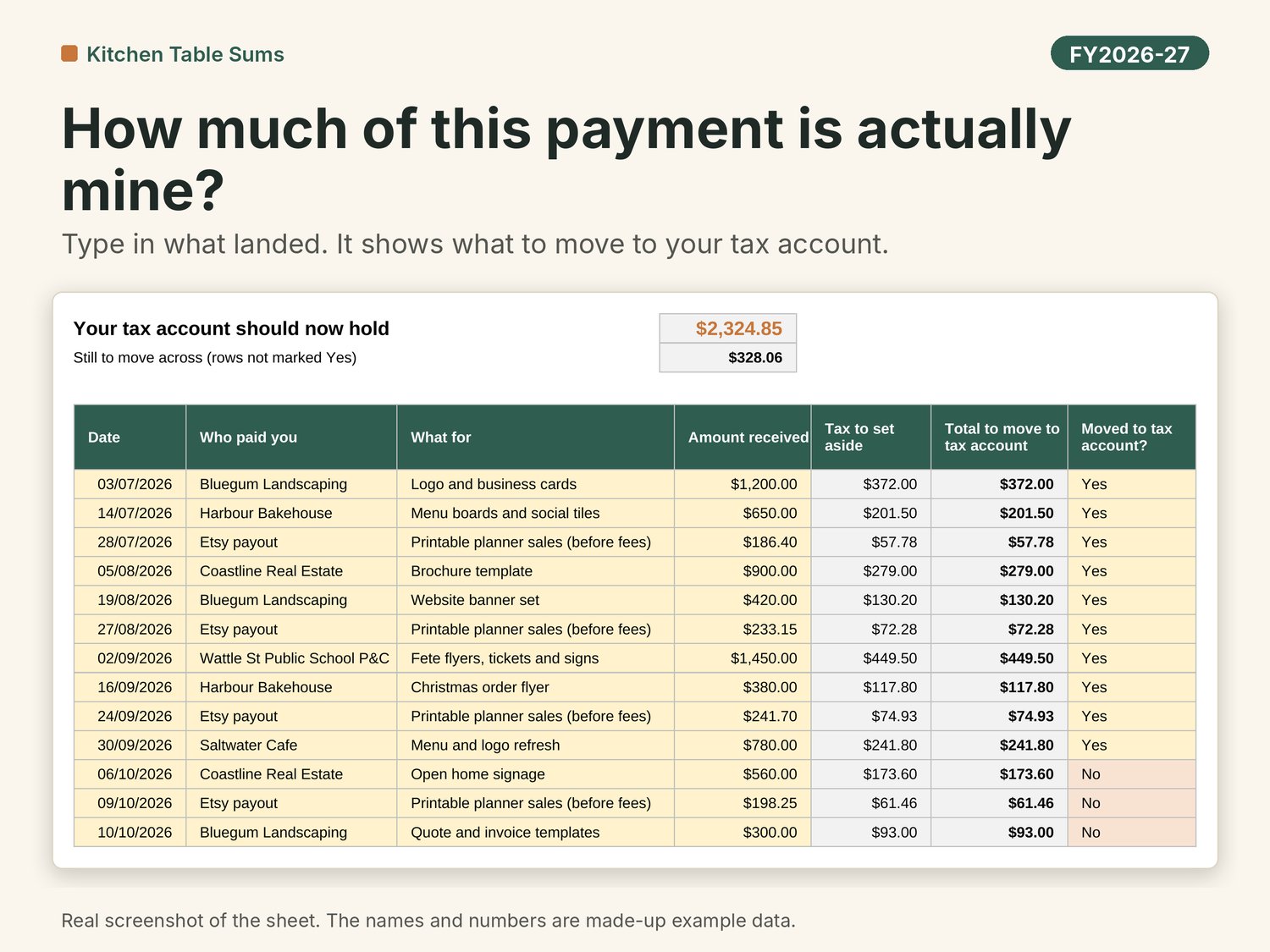
This sheet tells you, every time you're paid. Type in what landed. It shows how much to move to a separate tax account and what's left to keep. It counts the extra tax your side income adds on top of your wages, plus Medicare and HELP if you have a HECS debt.
Who it's for
- Anyone with an ABN alongside a job: freelancers, designers, tutors, cleaners, makers and online sellers.
- Sole traders who aren't registered for GST yet. Leave GST as No and the BAS labels switch off.
- The partner who has ended up doing the books at the kitchen table.
Who it's not for
- Companies, trusts and partnerships, or businesses with employees on payroll.
- Anyone who needs invoicing, bank feeds or full accounting software. This is a spreadsheet, not accounting software.
- People who aren't Australian residents for tax. The rates are for residents.
- Apple Numbers users.
About this edition
The example is Jess, a part-time freelance designer on $62,000 wages with a HELP debt. She expects about $24,000 of side income and $6,000 of costs this year. The sheet suggests she puts aside 31% of each payment, which is about 41% of her expected profit, because the % comes off each payment before costs. Many platforms now report what they pay you to the ATO, so the sheet asks you to log the full amount a platform collected (before its fees) and put the fees on Money Out.
What you get
Eleven tabs, starting with the Dashboard:
- Dashboard. The first thing you see when you open the file. The whole year at a glance: income so far, tax to set aside so far, what's in the tax pot, ahead or short, GST collected and the next BAS due. Below that, where the costs go, income by month, BAS quarters with due dates, and an income streams panel (who paid you, how many clients and platforms, your biggest client's share, platform fees).
- Start Here. Three steps to get going, the FY2026-27 due dates, what the colours mean, then the detail.
- Setup. A few questions: wages from a job, a guess at this year's business income and costs, GST yes or no, HELP debt yes or no. It suggests what % of each payment to put aside.
- Money In. One row each time you're paid. Shows the GST portion, the income tax to put aside and the total to move to your tax account.
- Money Out. Business costs, with a business-use % for things like your phone. Works out GST credits and the claimable amount.
- Car Kms. Your trip record. Estimates the cents per km amount at the 2026-27 rate (91 cents a km, up to 5,000 km), or keeps your logbook trips.
- BAS Quarters. G1, 1A and 1B for each quarter, your PAYG instalment if the ATO sent you one, the total to pay and the due date.
- Tax Pot. Compares the income tax you've actually moved with an estimate of the tax built up so far, and shows what's yours to keep.
- Accountant Summary. One printable page for tax time: income by payer, costs by category, quarter totals.
- Lists. Your expense categories. Rename them if ours don't fit.
- Rates. Every rate and date the sheet uses, with the ATO page it came from and the date it was checked.
Also in the download
- A step-by-step setup video that walks through the three steps.
- An example copy with made-up data to learn on, and a BLANK copy to fill in.
How it works
- Fill in Setup: your name, GST yes or no, wages from a job and a guess at this year's business income and costs. Guesses are fine. It suggests a % of each payment to put aside.
- Each time you're paid, add a row on Money In, move the "Total to move" amount to your tax account and mark the row Yes. Costs go on Money Out.
- Check the Dashboard to see if your tax pot is ahead or short. Each quarter, copy G1, 1A and 1B from BAS Quarters if you lodge a BAS.
Works in
- Made for Microsoft Excel (2019 or later, or Microsoft 365) and Google Sheets. Not for Apple Numbers.
- To use Google Sheets (free), upload the .xlsx to your Google Drive and open it with Google Sheets.
- No macros, no add-ons, no bank login. Your numbers stay on your computer or in your own Google Drive.
- A computer or laptop is best. A phone is fine for a quick look, not for setting up.
After you buy
- Your download link arrives by email straight after checkout.
- Download the files in a web browser (Chrome, Safari or Edge) on a computer.
- Watch the step-by-step setup video first. It walks through the three steps on Start Here.
- Open the example copy and have a look around, starting on the Dashboard. When you're ready, open the BLANK copy and start on Setup.
- Stuck? Reply to that email or write to kitchentablesums@gmail.com. I'll help with how the sheet works. I usually reply within a day or two.
Updates
Buy the FY2026-27 version and the FY2027-28 update is free. I'll email it to you before 1 July 2027.
Questions people ask
Q: I'm not registered for GST. Is this still for me?
A: Yes. Set GST to No on Setup. The GST columns stay at zero and Tax Pot tells you that you may have no BAS to lodge. If your income gets close to the $75,000 GST turnover line, the sheet points it out.
Q: Why is the suggested % so high when my side income is small?
A: Because it sits on top of your wages. Your side income is taxed at your top rate, plus Medicare and HELP if you have it.
Q: Is the suggested % what I'll actually owe?
A: No. It's an estimate. Your real tax is worked out when you lodge. Because the % comes off each payment before your costs, you'll often end up putting aside more than you owe. Tax Pot shows how far ahead or short you are, and you can change the % on Setup.
Q: Does it work if I sell through an online marketplace?
A: Yes. Log the full payout before the platform's fee on Money In, and the fee on Money Out.
Q: Can you tell me if I can claim something?
A: I can't, sorry. I'm not a registered tax agent, so I can't give advice on your own tax. I can help with how the sheet works. For what you can claim, check ato.gov.au or ask a registered tax agent.
Q: Is there a video to help me set it up?
A: Yes. A step-by-step setup video is in the download. It walks through the three steps on Start Here, using the example copy.
The small print
This sheet gives estimates only. It uses ATO rates for 2026-27 as published on 13/10/2026 and the numbers you type in. It's general information, not tax, financial or legal advice, and it doesn't look at your personal situation. I'm not a registered tax agent or BAS agent and I don't hold a financial services licence. Check your actual figures with the ATO or a registered tax agent before you lodge anything. This calculator is not intended to be relied on for making a decision about a financial product. Consider getting advice from a financial services licensee before making any financial decision.
Not affiliated with or endorsed by the ATO.
Personal use licence for the buyer. Please don't share or resell the files.
I used AI tools to help build this sheet. Every formula was checked against a separate calculation using Australian test scenarios before release.
Cheers,
Kitchen Table Sums