
Fortnightly Budget Spreadsheet Australia for Couples, Payday Planner, Excel and Google Sheets
Pay lands Thursday. By Monday neither of you could say where it went.
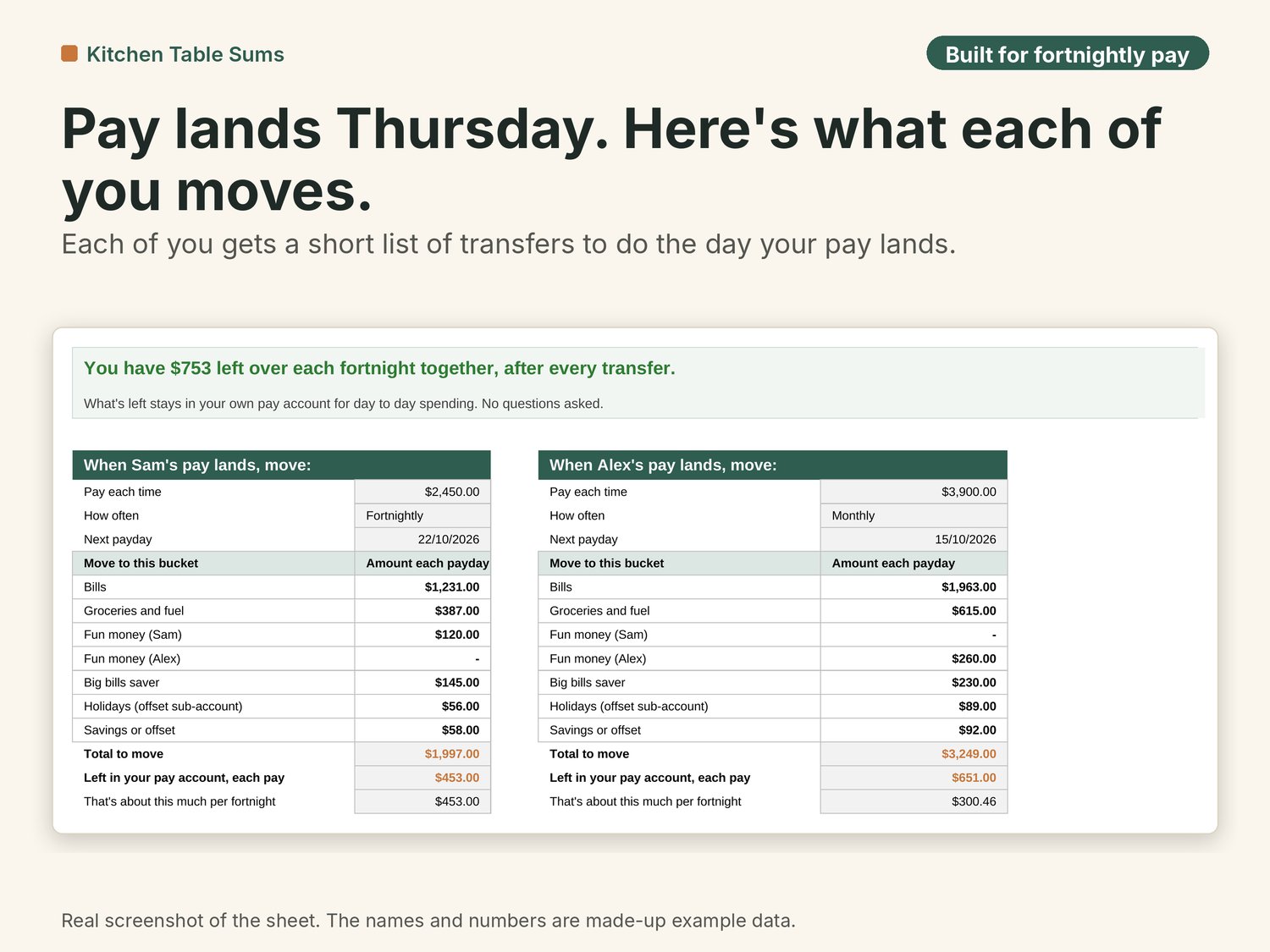
This sheet gives each of you a short list for payday: move $1,231 to bills, $387 to groceries, $145 to the big bills saver for rego and insurance, and so on. What's left in your own account is yours to spend. You type your pays and bills in once. After that, payday takes five minutes.
Who it's for
- Australian couples who share bills, paid weekly, fortnightly or monthly, on the same day or different days.
- Couples who want to pick how joint costs are split: 50/50, split by pay (the bigger pay puts in more), or your own %.
- Households using a bills account, bank savers or mortgage offset sub-accounts as buckets.
Who it's not for
- People who want to log every coffee and every grocery receipt. This plans your paydays, it doesn't track each purchase.
- Anyone who wants it to connect to their bank. There's no bank login, on purpose.
- Business or ABN income. For that, see the bundle with the Sole Trader Tax Tracker.
- Apple Numbers users.
About the example
Sam is paid $2,450 every second Thursday. Alex is paid $3,900 on the 15th of each month. Their bills are the usual: mortgage, council rates, power, internet, childcare gap fees, groceries, rego, CTP green slip, Christmas. Split by pay, Sam covers 58% of joint costs and Alex 42%. After every transfer they have $753 a fortnight left between them for day to day spending.
What you get
Ten tabs, starting with the Dashboard:
- Dashboard. The first thing you see when you open the file. The whole budget on one page: Take-home, minus Moved to accounts, equals Left to spend, then the big bills saver, the bills buffer and the lowest bills balance. Below that, where each fortnight goes, what each of you moves, a payday and bill calendar, bills by month, the next 5 bills and the Christmas saver.
- Start Here. Three steps to get going, what the colours mean, the example couple and the fine print.
- Our Pay. Each take-home pay, how often it lands (weekly, fortnightly or monthly) and the next payday. Works for one person too.
- Bills and Spending. Every regular bill and spending line once, with how often it comes, which bucket pays it and who pays. Each line becomes a per-fortnight cost.
- Buckets. The accounts you move money into: a bills account, groceries, fun money for each of you, a big bills saver for rego and insurance, bank savers or offset sub-accounts.
- Payday Plan. The page to open on payday. Each of you gets a short list of what to move and where, and what's left to spend.
- Bills Buffer. Walks a full year of paydays and dated bills, finds the lowest bills balance and tells you the cushion your bills account needs so nothing bounces.
- Fortnight Check-in. One row and a 20 minute chat every second Sunday.
- Christmas. Gifts, food and travel, with what to put aside each fortnight until 25 December.
- Settings. The drop-down lists, the rounding (transfers round up to the next dollar unless you change it) and the few fixed numbers.
Also in the download
- A step-by-step setup video that walks through the three steps.
- Light and dark versions included. Prefer a dark screen? Open the DARK copy. It works the same way.
- An example copy with a made-up couple, Sam and Alex, to learn on, and a BLANK copy to fill in.
How it works
- On Our Pay, type each take-home pay, how often it lands and the next payday. On your own? Leave Person 2 empty.
- On Bills and Spending, list each regular bill and spending line once, how often it comes, which bucket pays it and who pays.
- When your pay lands, open the Payday Plan and do the transfers it lists. What's left in your pay account is yours to spend. The Dashboard shows the big picture.
Works in
- Made for Microsoft Excel (2019 or later, or Microsoft 365) and Google Sheets. Not for Apple Numbers.
- To use Google Sheets (free), upload the .xlsx to your Google Drive and open it with Google Sheets.
- No macros, no add-ons, no bank login. Your numbers stay on your computer or in your own Google Drive.
- A computer or laptop is best. A phone is fine for a quick look, not for setting up.
After you buy
- Your download link arrives by email straight after checkout.
- Download the files in a web browser (Chrome, Safari or Edge) on a computer.
- Watch the step-by-step setup video first. It walks through the three steps on Start Here.
- Open the example copy and have a look around, starting on the Dashboard. When you're ready, open the BLANK copy and start on Our Pay. Prefer a dark screen? Use the DARK copies.
- Stuck? Reply to that email or write to kitchentablesums@gmail.com. I'll help with how the sheet works. I usually reply within a day or two.
Questions people ask
Q: We earn very different amounts. Is 50/50 fair?
A: That's up to you. The sheet does three ways: 50/50, split by pay, or a custom %. Change it and every transfer updates.
Q: How long does setup take?
A: About ten minutes if you know your pay and have your banking app open for the bills. The example shows you what goes where.
Q: We bank with different banks. Does that matter?
A: No. Buckets are just names. A bills account, a bank saver or an offset sub-account all work. Use what you've got.
Q: Is there a monthly version?
A: No, and you don't need one. Pick Monthly on Our Pay and your Payday Plan shows a monthly amount for each bucket. Behind the scenes the sheet does its sums in fortnights, so a $260 monthly bill counts as $120 a fortnight.
Q: Can we both use it?
A: Yes. Upload it to Google Drive and share it with each other, or keep it on the family laptop.
Q: Is there a dark version?
A: Yes. The download has light and dark copies of the example and the BLANK file. They work the same way, so pick the one you like looking at.
The small print
This is a budgeting tool, not financial advice. It does the sums on the numbers you type in and doesn't know your full situation. This calculator is not intended to be relied on for making a decision about a financial product (such as a bank account, offset account or loan). Consider getting advice from a financial services licensee before making any financial decision. If bills are getting on top of you, the free National Debt Helpline is on 1800 007 007 (ndh.org.au).
Personal use licence for the buyer. Using it at home with your partner is fine. Please don't share or resell the files.
I used AI tools to help build this sheet. Every formula was checked against a separate calculation using Australian test scenarios before release.
Cheers,
Kitchen Table Sums