
Investment Property Tracker Australia FY2026-27, Rental Income and Expenses Spreadsheet for Landlords, Excel Google Sheets
The agent's statement lands. $2,480 of rent, $190.96 in fees, $2,289.04 into your account. Looks fine. Then the strata levy, the council rates, the water bill and about $1,800 of loan interest go out the same month. So is the unit actually making money? And at tax time, when your tax agent asks for everything, is it all in one place?
This sheet keeps a year of rental records for up to three properties and adds them up. Type in what the agent paid you, the bills you paid and the interest from your loan statement. It shows each property's net cash before tax, splits it between two owners, and prints one page per property for your tax agent, set out in the order of the ATO rental schedule.
It keeps records. It doesn't work out your tax, negative gearing, capital gains or depreciation.
Who it's for
- Australians with one to three residential investment properties, owned alone or with a partner.
- People who keep their own records and hand them to a tax agent at tax time.
- The partner who ends up with the shoebox of agent statements.
Who it's not for
- Property owned through a company, trust or SMSF.
- Holiday homes or short-stay places you also use yourself. Those need extra splitting the sheet doesn't do.
- Commercial property, more than three properties, or more than two owners on one property.
- Anyone after a tax, negative gearing or capital gains calculation. This is a record keeper, not accounting software.
- Apple Numbers users.
About the example
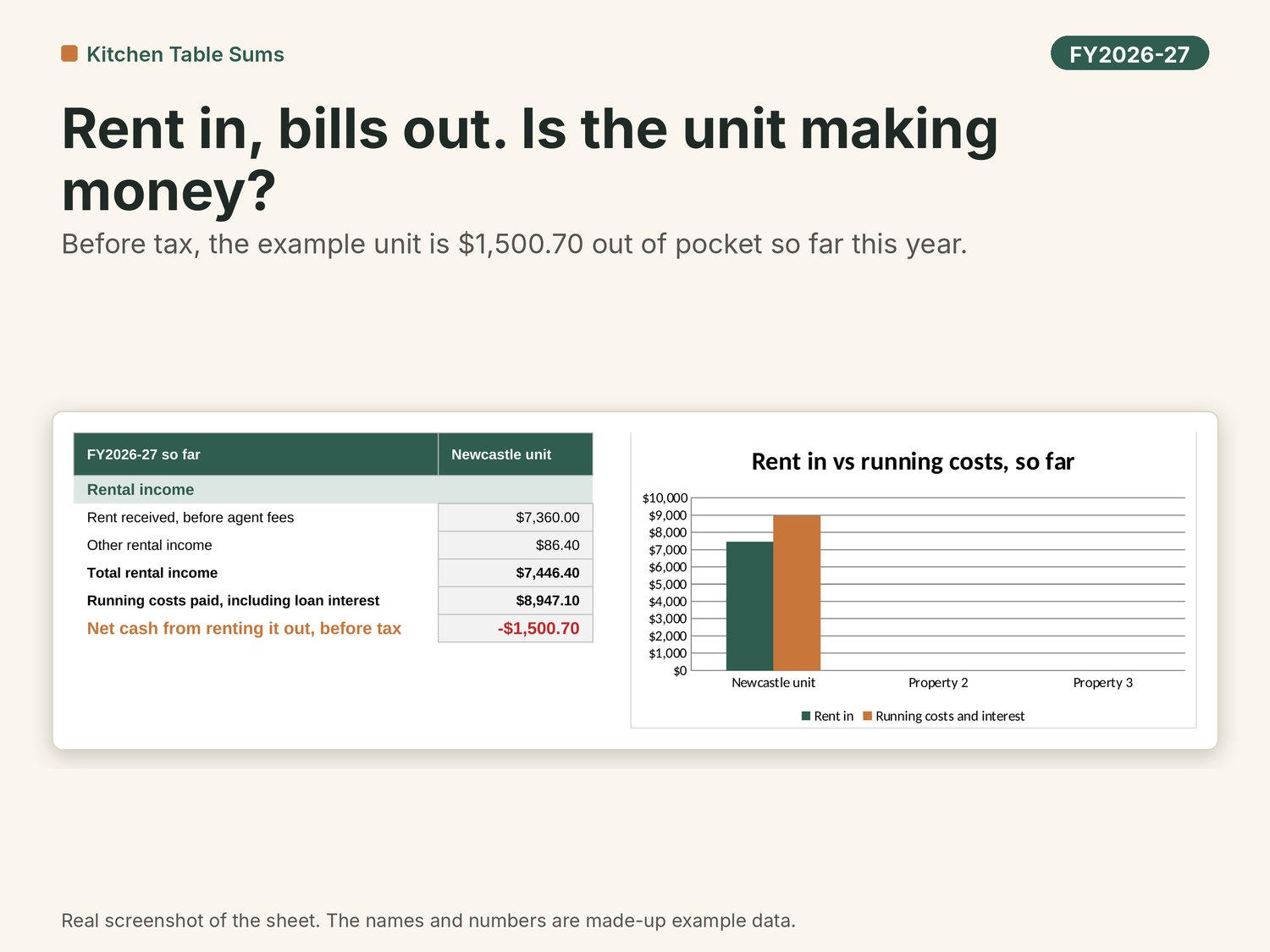
The example is Kate and Ben, who own a 2-bedroom unit in Hamilton, Newcastle, half each. They bought it in March 2021 and it rents for $560 a week through an agent. From July to September 2026 the rent came to $7,360 plus $86.40 of water usage passed on to the tenant. Running costs, including $731.72 of agent fees and $5,450.20 of interest, came to $8,947.10. So before tax the unit is $1,500.70 out of pocket so far, or $750.35 each. The new dishwasher and a drive up from Sydney are recorded too, but kept out of that figure.
What you get
Ten tabs, starting with the Dashboard:
- Dashboard. The first thing you see when you open the file. The year at a glance: rent received, costs paid, net rent before tax, the ownership split and months recorded. Below that, rent in against costs out by month, where the costs go, a ready for your tax agent checklist and an agent fees card.
- Start Here. Three steps to get going, what the colours mean, the example, then the detail, the Budget note and the fine print.
- Properties. Up to three, side by side: a nickname, purchase date and price, two owners and their shares, new build or established, and whether you held it before Budget night (record only).
- Rent In. One row per agent statement: the full rent before fees and the fees the agent took out, kept separate.
- Costs. Each bill, with a category in ATO rental schedule order, notes, and whether you've kept the receipt.
- Loan. Interest charged and principal repaid each month for each property, with the offset balance if you want it.
- Depreciation. This year's Division 43 and Division 40 figures, copied from your quantity surveyor's schedule. Never worked out by the sheet.
- Summary. Each property and all of them together: rent, costs by category, interest, net cash before tax, capital spending, depreciation as typed, receipts still missing, and each owner's share.
- Accountant Page. Pick a property and print one A4 page for your tax agent.
- Rates and Notes. Every date the sheet uses, the category list, and where each rule came from, with links to the ATO and Treasury pages.
Also in the download
- A step-by-step setup video that walks through the three steps.
- An example copy with made-up data to learn on, and a BLANK copy to fill in.
How it works
- Set up your properties. On Properties, give each place a short nickname, like "Newcastle unit", add the purchase details and who owns what share.
- Log it each month. Copy your agent's statement onto Rent In, add bills on Costs, and type the interest from your loan statement on Loan. About 5 minutes.
- Hand it over. At tax time, add your depreciation schedule figures, check the ready for your tax agent list on the Dashboard, then print the Accountant Page for each property.
Works in
- Made for Microsoft Excel (2019 or later, or Microsoft 365) and Google Sheets. Not for Apple Numbers.
- To use Google Sheets (free), upload the .xlsx to your Google Drive and open it with Google Sheets.
- No macros, no add-ons, no bank login. Your numbers stay on your computer or in your own Google Drive.
- A computer or laptop is best. A phone is fine for a quick look, not for setting up.
After you buy
- Your download link arrives by email straight after checkout.
- Download the files in a web browser (Chrome, Safari or Edge) on a computer.
- Watch the step-by-step setup video first. It walks through the three steps on Start Here.
- Open the example copy and have a look around, starting on the Dashboard. When you're ready, open the BLANK copy and start on Properties.
- Stuck? Reply to that email or write to kitchentablesums@gmail.com. I'll help with how the sheet works. I usually reply within a day or two.
Updates
Buy the FY2026-27 version and the FY2027-28 update is free. I'll email it to you before 1 July 2027.
Questions people ask
Q: Does it work out my negative gearing or what I'll save in tax?
A: No. It keeps your records and adds them up, so your tax agent has everything. The negative gearing and capital gains changes from the May 2026 Budget passed Parliament in June 2026 and start on 1 July 2027. Some of the detail is still being worked out. The sheet only records the facts that may matter: new build or established, and whether you held the place before 7:30pm AEST on 12 May 2026.
Q: My agent takes their fees out before paying me. Where do they go?
A: On Rent In, type the full rent in one column and the fees the agent took out in the next. The sheet shows what landed in your account, and the fees still show up on the Summary under agent fees.
Q: Where does the loan interest go?
A: On the Loan tab, month by month, from your loan statement. If you type interest on Costs as well, the sheet flags that row and leaves it out, so it's never counted twice.
Q: Can I put my travel to the property in?
A: You can record it, but in most cases travel to a residential rental property can't be claimed. The sheet keeps it as a record only and leaves it out of the net cash figure.
Q: Does it work out depreciation?
A: No. Type this year's figures from your quantity surveyor's schedule. In most cases you can't claim second-hand plant in a residential rental, like the carpets and appliances that came with an established place. Your schedule should already allow for that.
Q: We own it 60/40. Does that work?
A: Yes. Type each share on Properties and the Summary and Accountant Page split everything that way. If the shares don't add up to 100%, it tells you.
Q: Can you tell me if I can claim something?
A: I can't, sorry. I'm not a registered tax agent, so I can't give advice on your own tax. I can help with how the sheet works. For what you can claim, check ato.gov.au or ask a registered tax agent.
Q: Is there a video to help me set it up?
A: Yes. A step-by-step setup video is in the download. It walks through the three steps on Start Here, using the example copy.
The small print
This sheet keeps records and adds up the numbers you type in. It doesn't work out your tax, your deductions, negative gearing or capital gains. It's general information, not tax, financial or legal advice, and it doesn't look at your personal situation. I'm not a registered tax agent or a financial adviser, and I don't hold a financial services licence. Check with the ATO or a registered tax agent before you lodge anything. This calculator is not intended to be relied on for making a decision about a financial product (such as a loan or an offset account). Consider getting advice from a financial services licensee before making any financial decision.
The negative gearing and capital gains changes from the May 2026 Budget start on 1 July 2027, and some of the detail is still being settled (checked 14/10/2026). Ask a registered tax agent how they apply to you.
Not affiliated with or endorsed by the ATO.
Personal use licence for the buyer. Please don't share or resell the files.
I used AI tools to help build this sheet. Every formula was checked against a separate calculation using Australian test scenarios before release.
Cheers,
Kitchen Table Sums